

Languages
English,Japanese,Korean,Chinese
About this app
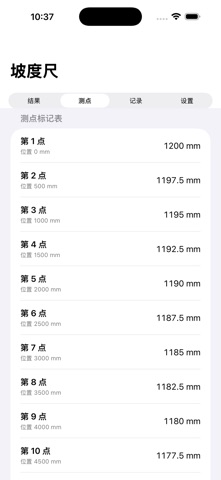
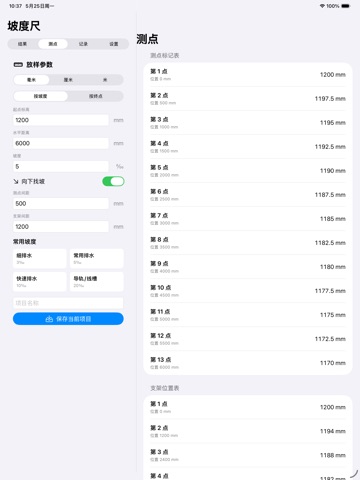
Pipe Slope Mark Calculator is an offline utility for installation, renovation, and repair work sites. It helps quickly calculate slope layout data for drain pipes, cable trays, rails, and similar linear runs. Enter a start elevation, end elevation, horizontal distance, or target slope, and the app automatically converts the values into mark heights for each measuring point. You can also generate support, clamp, or hanger position tables at fixed spacing to reduce manual calculation errors. The app supports millimeter, centimeter, and meter units, common slope templates, local project records, reverse slope calculation, error reminders, and elevation difference checks. All data is stored only on your device. No login, internet connection, ads, cloud sync, or personal data collection is required.
Screenshots



iPad screenshots


Features
- Slope Forward and Backward Calculation: Input Distance, Slope, Starting Elevation, or Ending Elevation
- Automatic Missing Data Calculation
- Measurement Point Marking Table: Generate Theoretical Heights for Each Measurement Point Based on Fixed Intervals
- Convenient for On-Site Marking
- Support Spacing Planning: Generate Positions of Supports, Hangers, and Clamps Along with Corresponding Elevations
- Common Slope Templates: Save Common Slope Ratios and Project Parameters
- Quick Recall for Repeated Construction
- Unit Conversion: Support Conversion Between Millimeters, Centimeters, and Meters
- Error Check: Alert for Issues Such as Insufficient Height Difference, Reversed Slope Direction, and Measurement Points Outside Range
- Local Project: Save Multiple Project Records
- Convenient for subsequent review