

Languages
English,Japanese,Korean,Chinese
About this app
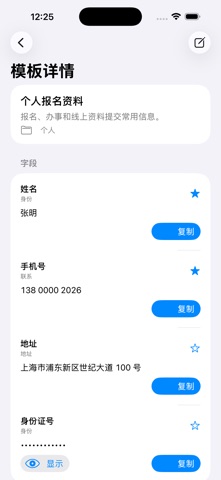
Form QuickFill is a local information manager for daily paperwork, registrations, reimbursements, shipping, and document submission. Save commonly used names, addresses, ID details, company information, invoice titles, bank notes, and other fields as reusable templates. When filling a form, quickly find what you need and copy it with one tap to reduce repeated typing and missed fields. The app requires no account, does not connect to servers, and does not collect user data. It is suitable for anyone who regularly handles paper or digital forms, family information, company reimbursement details, or registration materials. Key features: 1. Reusable info templates: Create multiple templates for personal, family, company, reimbursement, shipping, and other scenarios, with custom field ordering. 2. One-tap copy: Copy each field instantly, pin frequently used fields, and access recent usage records. 3. Local organization: Create folders by scenario, with search, tags, favorites, and archive support. 4. Privacy protection: Hide sensitive fields, and protect app access with system biometrics or device passcode. 5. Offline backup: Export and import local files for device transfers or offline backup.
Screenshots


iPad screenshots


Features
- 1. Common Document Templates: Supports creating personal, family, company, reimbursement, and shipping document templates
- Fields can be customized for sorting order
- 2. Quick Copy Filling: Each field can be copied with one click
- Supports placing frequently used fields at the top and showing recent usage history
- 3. Local Category Management: Create document folders by scenario
- Supports search, tags, favorites, and archiving
- 4. Privacy Protection: Can enable hidden display for sensitive fields
- Enter the application to use system biometric recognition or device password protection
- 5. Export Backup: Supports local file export and import
- Convenient for switching phones or offline backup