

Languages
English,French,German,Japanese,Korean,Portuguese,Russian,Chinese,Spanish
About this app
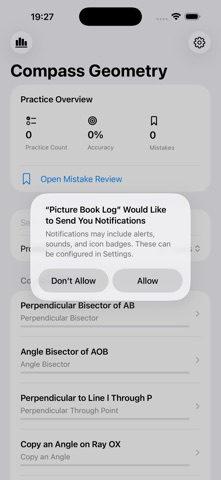
Compass Geometry Drills is an offline practice tool for middle school geometry, focused on learning steps, doing exercises, and reviewing mistakes. It breaks common compass-and-straightedge construction problems into clear checklist steps so students can understand the order and reasoning behind each construction. Key features: 1. Construction question bank: Covers perpendicular bisectors, angle bisectors, perpendicular lines through a point, copying angles, triangle constructions, and other common topics. 2. Step breakdowns: Each exercise includes given conditions, the goal, construction steps, and key reasons for self-study after class. 3. Draft markings: Record auxiliary lines, intersections, arcs, and key conclusions to build your own solution process. 4. Mistake review: Save missed problems, difficulty tags, and review status for focused practice by topic. 5. Progress stats: Track practice count, accuracy, mistake distribution, and recent review records locally. All data stays on your device. No login is required, the app does not connect to the internet, and no personal information is collected.
Screenshots



Features
- Built-in junior high school geometry ruler and compass problem set
- Practice by question type
- Each question displays conditions, goals, step-by-step breakdown, and drawing rationale
- Supports draft markings for auxiliary lines, intersections, arcs, and key conclusions
- Can save difficult questions for error review
- Local statistics for practice progress, accuracy, and weak question types
- Supports offline use and local data storage