

Languages
English,French,German,Japanese,Korean,Portuguese,Russian,Chinese,Spanish
About this app
Delivery Note is a local offline document tool for small merchants, wholesalers, and installation or delivery teams. No login and no internet connection are required. You can create customer profiles, item details, delivery notes, and signed receipts, then export PDF files suitable for printing or sharing. It is useful for daily shipments, store delivery, customer sign-off, installation handover, and quick replacement paperwork. It helps reduce handwritten forms and repeated layout work. All data is stored only on your device, making it suitable for long-term use after a one-time download. Key features: 1. Delivery note editing: customer information, delivery address, item name, quantity, unit price, notes, handler, and signature area. 2. Auto numbering and reusable templates: generate document numbers by date and reuse common customers, items, and notes. 3. PDF export and printing: create A4 delivery notes, shipping slips, or receipt PDFs with local preview and sharing. 4. Local customer and item library: save frequent customers, contacts, item specs, and prices with quick search. 5. Document archive: filter history by customer, date, and status for reprinting and reconciliation.
Screenshots



Features
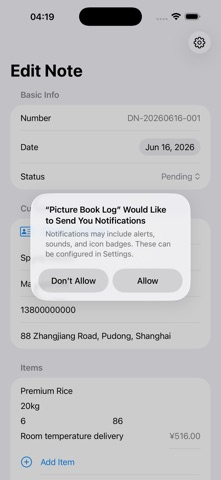
- 1. Delivery Order Editing: Supports Customer Information, Delivery Address, Product Name, Quantity, Unit Price, Remarks, Handler, and Sign-off Section
- 2. Auto-Numbering and Template Reuse: Generates Order Numbers Based on Date
- Frequently Used Customers, Products, and Remarks Can Be Reused
- Reduce repetitive input
- 3. PDF Export and Printing: Creates A4 Delivery Orders, Shipping Orders, or Sign-off Orders PDF
- Supports Local Preview and Sharing
- 4. Local Customer and Product Library: Saves Frequently Used Customers, Contacts, Product Specifications, and Prices
- Supports quick search
- 5. Document Archiving: Filters Historical Documents by Customer, Date, and Status
- Convenient for Reprinting and Reconciliation